UTM Builder and UTM Checker for GA4, in your browser
Build a tagged link, see the GA4 channel it will land in before you share it, and check every link on a page or in an email draft.
Chrome extension · v0.4.0 · no account needed · try it online first
What it does
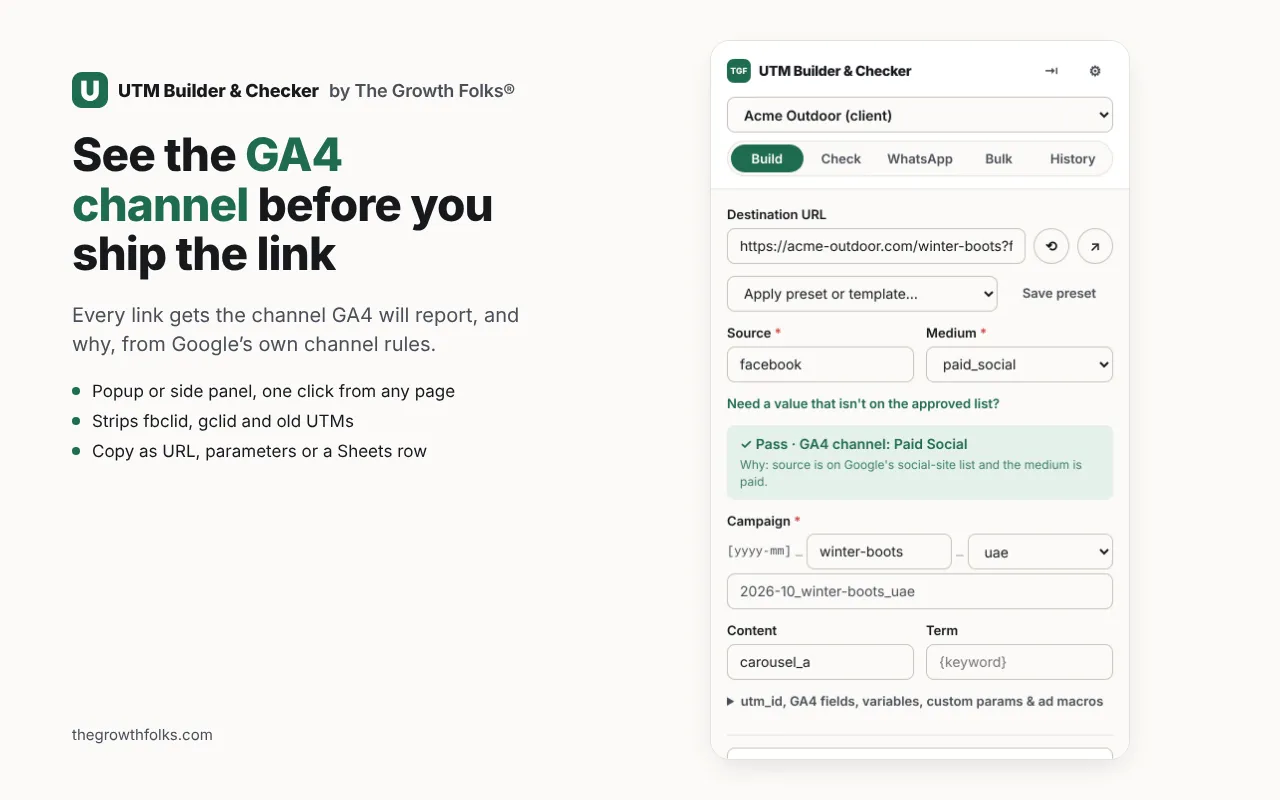
- GA4 channel prediction, with the reason A link tagged medium=social ends up in Unassigned, and nobody notices until the monthly report. You see the channel before the link goes out.
- Uses Google's default channel rules and official source list, including the AI Assistant channel
- Shows the rule that decided the channel
- One-click fixes for Unassigned, Paid Other and paid traffic counted as organic
- UTM checker for any page Find the broken links on a page before your visitors click them.
- Grades every link as Critical, Warning or Pass
- Catches UTMs after #, a second ?, broken macros, mixed case and duplicates
- Highlights any link on the page with one click
- Check email links before you send Once an email has gone out, a bad link stays bad.
- Reads the draft open in Gmail, Outlook on the web, HubSpot, Mailchimp or Klaviyo (Pro)
- Or paste the email's HTML and copy back the fixed version
- Merge tags are marked unverifiable, not broken
- WhatsApp click-to-chat links UTMs on a wa.me link never reach GA4, so the tagged link has to sit inside the message.
- Builds the wa.me link with a pre-filled message and a tagged website link
- Adds a ref code so you can tell campaigns apart in chat
- QR code for print, packaging or shop windows
- Team rules file Everyone on the account uses the same sources, mediums and campaign names.
- One JSON file per client: approved values, allowed domains, casing and campaign pattern
- Preview what will change before you import it
- Lock values and export the file for your team (Pro)
- Bulk links, QR codes and every copy format Tag a whole launch in one go and paste the result wherever it's needed.
- Bulk matrix and CSV upload with a GA4 verdict per row (10 rows on Free)
- Copy as a full URL, Meta parameters, a Google Ads final URL suffix or a Sheets row
- Styled QR codes, and short links with your own Bitly, Dub or Rebrandly key
-
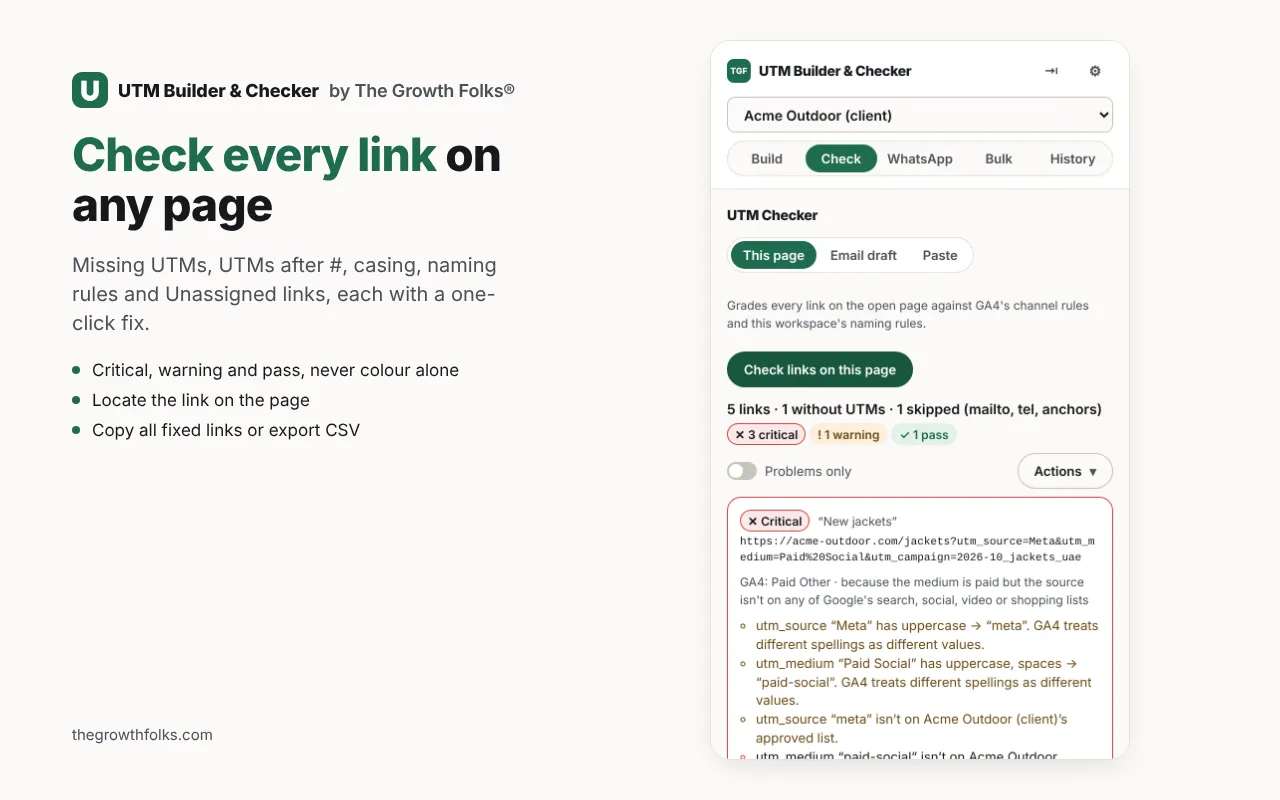
UTM Checker grading every link on a web page with critical, warning and pass levels -
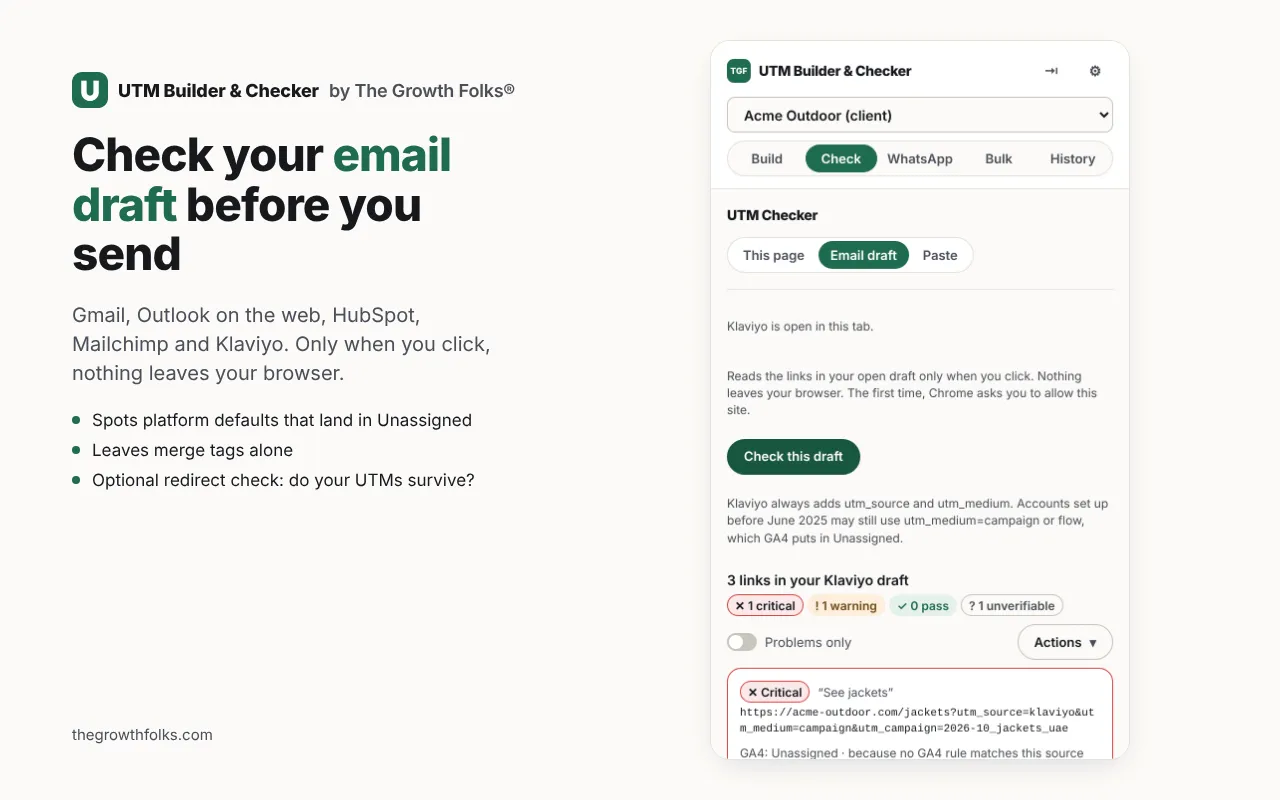
Checking the links in an email draft before sending, including a duplicate and a merge tag -
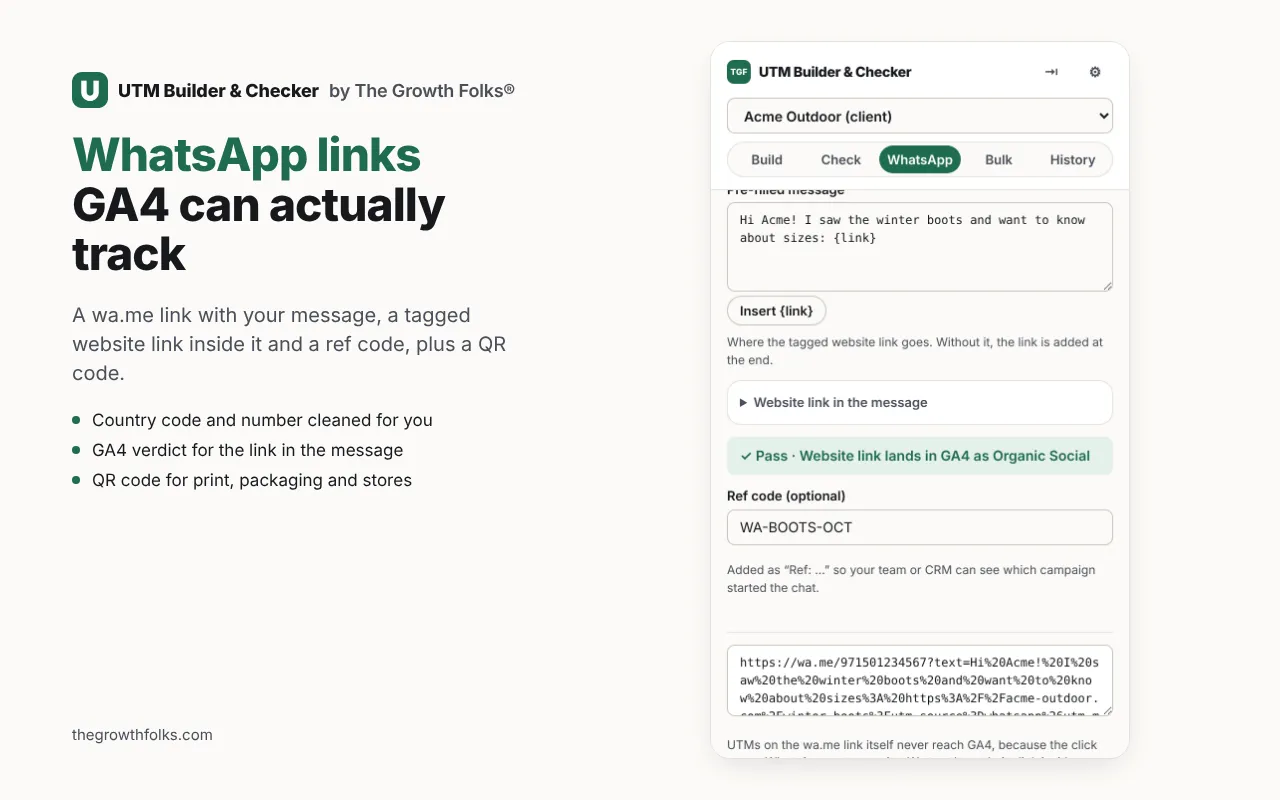
WhatsApp click-to-chat link builder with a tagged website link inside the message and a QR code -
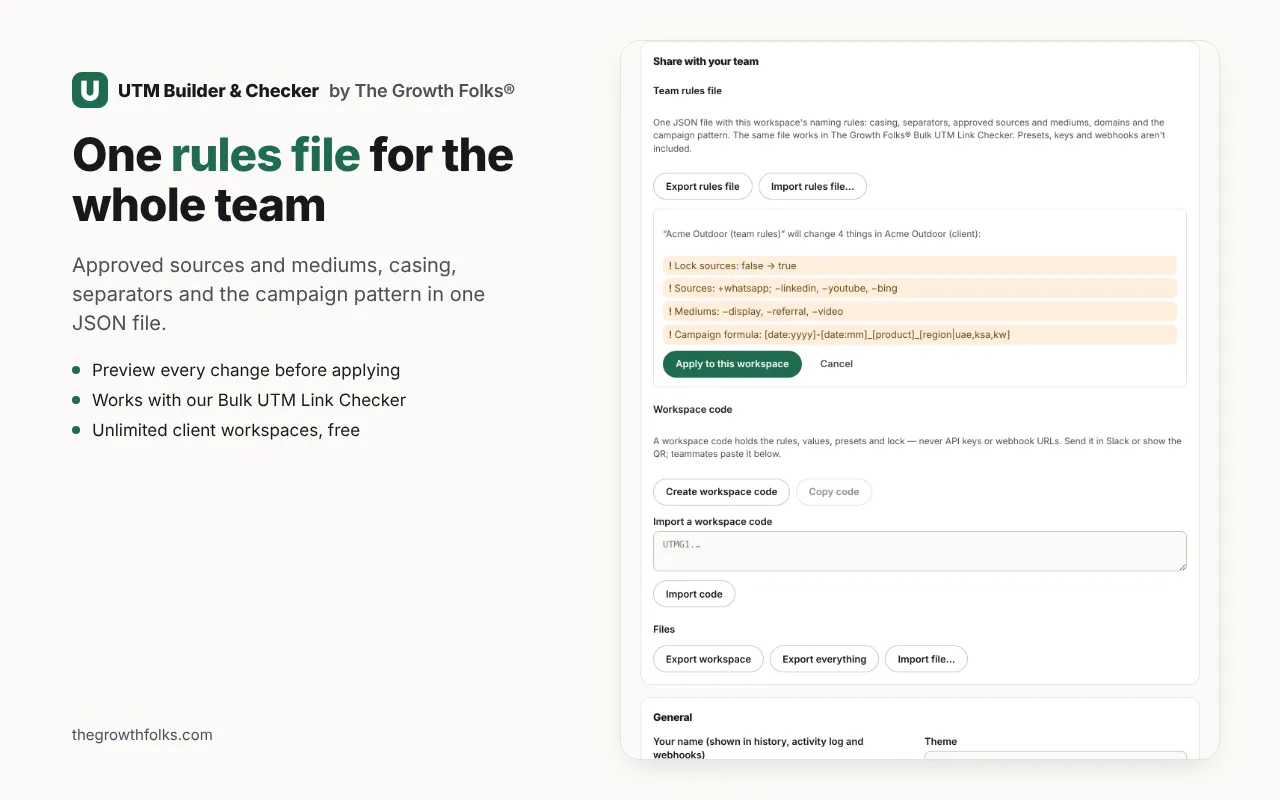
Importing a team rules file in Settings with a preview of what will change -
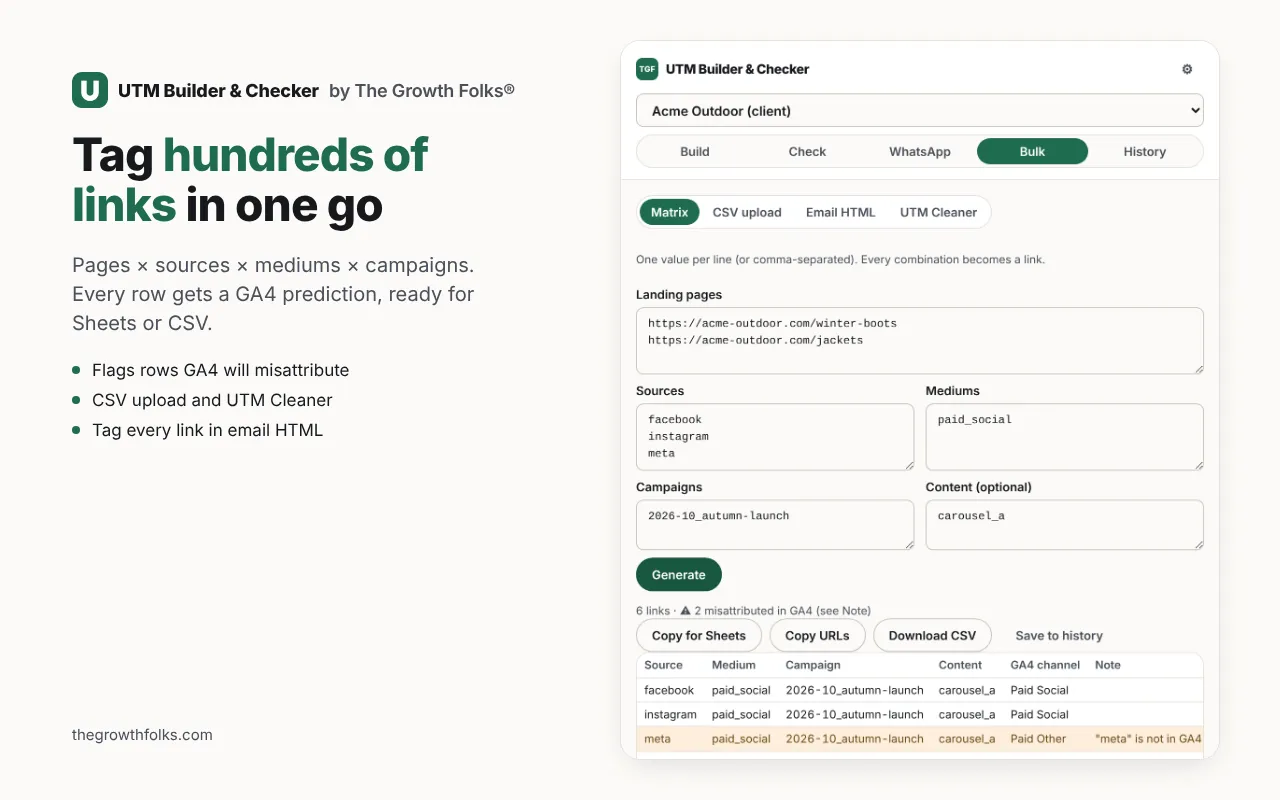
Bulk matrix generating every UTM combination with a GA4 prediction per row
Try the online version
No install needed. The Chrome extension adds saved presets, client workspaces, bulk links and one-click access on any page.
Fill in the URL, source, medium and campaign to generate your link.
How to use UTM Builder & Checker for GA4
- Add UTM Builder & Checker to Chrome from the Chrome Web Store and pin it to your toolbar.
- Open the page you want to promote and click the icon (or press Alt+U). Enter source, medium and campaign and watch the GA4 channel and its reason update as you type.
- Copy the link in the format you need, or make a QR code or short link.
- Open the Check tab to grade every link on a page, in an email draft or in pasted HTML, then copy the fixed links.
- In Settings, create a workspace per client or import your team rules file so everyone uses the same names.
Free and Pro
The free plan never expires. Pro is $6 a month or $60 a year, with a 7-day free trial.
Free
- UTM builder with the GA4 channel and the rule behind it
- Check every link on a page, or in pasted email HTML
- WhatsApp click-to-chat links and QR codes
- One workspace, and importing a teammate’s rules
- Bulk runs of up to 10 links
Pro from $6 a month
- Unlimited client workspaces
- Export your team rules file and workspace codes, and lock a workspace
- Check the links in a draft inside your webmail or email platform before you send
- Bulk matrix, CSV and cleaner runs of any size
- Send every copied link to a webhook or Google Sheet
Who it’s for
- Performance marketers running paid social and search
- Email and lifecycle teams checking links before a send
- Agencies managing UTM conventions for several clients
- D2C and retail teams selling on WhatsApp
- Marketing ops and analytics teams cleaning up GA4 attribution
What it can access, and why
Everything runs in your browser. Each permission and what it is used for:
Show all 10 permissions
-
activeTabReads the URL and title of the tab you're on when you open the extension, to pre-fill the destination. When you click "Check links on this page", it lets the extension read that tab's link addresses and text. -
storageSaves your workspaces, settings, link history and unfinished forms in your browser. -
contextMenusAdds "Build UTM link for this link / page" and "Check UTM links on this page" to the right-click menu. -
sidePanelLets you dock the extension in Chrome's side panel while you work. -
clipboardWriteCopies links, parameters, Sheets rows, fixed HTML and WhatsApp messages when you click a Copy button. -
scriptingRuns a short, read-only function in the tab when you click Check, Locate or Test landing, to list links, highlight one or read the final URL. Nothing runs on pages you haven't asked to check. -
Optional: mail.google.com, Outlook on the web, app.hubspot.com, *.mailchimp.com, www.klaviyo.comRequested only when you click "Check this draft" on that site. Lets the extension read the links inside the draft you have open, including editors that render the email in a frame. -
Optional: api-ssl.bitly.com, api.dub.co, api.rebrandly.comRequested only if you set up a link shortener. Lets the extension create short links and read click counts with your own API key. -
Optional: all http/https sitesRequested only if you turn on Live link checks, click Check redirects or set up a webhook (then only that one site). Lets the extension check for 404s and redirects that drop your UTMs, or post links to your webhook. -
Optional: tabsRequested only if you turn on "Side panel follows the tab you're on", so the destination URL updates when you switch tabs.
Full details in the privacy policy.
Add UTM Builder & Checker for GA4 to Chrome
Free to install, no account. Upgrade to Pro from $6 a month when you need it.
Frequently asked questions
Is UTM Builder & Checker free?
Building and checking links is: the GA4 channel check, page and pasted-email checks, WhatsApp links, QR codes, one workspace and bulk runs of up to 10 links. Pro ($6 a month or $60 a year, 7-day free trial) adds unlimited client workspaces, sharing rules with your team, email draft checks, bulk runs of any size and webhooks. There's no account either way.
How accurate is the GA4 channel prediction?
It implements Google's published default channel group rules for manually tagged traffic (as of 13 May 2026) and Google's official source list. Custom channel groups in your own GA4 property aren't taken into account.
Does it read my emails?
No. The email check only runs when you click "Check this draft" on a draft you have open, and only after you allow that one site. It reads the link addresses and link text inside the draft body, checks them in your browser and sends nothing anywhere.
Why don't UTMs on a wa.me link show up in GA4?
The wa.me link opens WhatsApp, not your website, so GA4 never sees it. Put a tagged link to your website inside the message instead. The WhatsApp tab does this for you with a {link} placeholder.
Why does it ask for access to all websites?
It doesn't at install. That permission is optional and only requested if you turn on Live link checks or click Check redirects, which send a request without cookies to the links you're checking to find 404s and redirects that drop UTMs.
Should I add UTMs to links on my own website?
No. Internal links with UTMs overwrite the original source of the visit and break your attribution. Use them only on links that point to your site from somewhere else.
Tactics this tool helps with
- Acquisition
Audit your tracking before you scale ad spend
Check every pixel, tag and conversion event fires once, with the right values, before you raise budgets that depend on that data.
Impact High Effort Low + free toolCategories: Analytics, Paid Ads - Acquisition
Build a viral pre-launch waitlist where referrals move you up
Give every waitlist sign-up a personal link and a visible place in line, and move them up each time a friend joins through their link.
Impact High Effort Medium + free toolCategories: Email, Social Media, Conversion - Acquisition
Match each landing page to the ad and audience that sends traffic
Build a separate landing page for each ad group or audience so the headline, offer and proof repeat exactly what made people click.
Impact High Effort Medium + free toolCategories: Conversion, Paid Ads, A/B Testing - Acquisition
Buy niche newsletter sponsorships and measure what they return
Place ads in small, focused newsletters your buyers read, test them in small batches, and track each placement with its own link and offer.
Impact Medium Effort Low + free toolCategories: Paid Ads, Email, Analytics - Acquisition
Protect your brand search terms and bid on competitors carefully
Run search ads on your own brand name to hold the top spot, and target competitor terms with honest ads that respect ad policies and trademark rules.
Impact Medium Effort Low + free toolCategories: Paid Ads, Conversion - Acquisition
Set a UTM naming convention before your next campaign
Agree on how you tag links so your analytics groups traffic correctly instead of splitting it across typos.
Impact Medium Effort Low + free toolCategories: Analytics, Paid Ads
Learn the framework behind it
Free lessons from the Growth Marketing Academy that explain the why, so you use the tool well.
- Track 2 · Acquisition Growth Loops: Build Acquisition That Compounds Funnels describe how users leak. Loops describe how users create more users. Learn to map, quantify and choose the loop that fits your product.
- Track 2 · Acquisition Paid Acquisition Architecture and Channel-Model Fit Structure paid accounts, run a creative testing cadence, read CAC, blended CAC, MER and ROAS correctly, and pick channels your price point can afford.
- Track 2 · Acquisition Viral Loops and the K-Factor: The Math of Users Bringing Users Calculate your viral coefficient, cycle time and amplification factor, and design incentives that raise K without attracting fraud or low-quality users.
Want this handled for you?
Our growth agency sets up tracking, testing and campaigns end to end: strategy plus execution.
More free tools
- Live
Pixel & Tag Checker
Check GA4, GTM, Meta, TikTok and ChatGPT Ads pixels, see what fires before consent, and send clients a polished audit report.
Get the extension → - Free
A/B Test Calculator
Check if a test result is real, and how much traffic you need before you start.
Use it free → - Free
Meta Tag Generator
Write title, description and social tags with live Google and social previews.
Use it free →