Pixel & Tag Checker for GA4, GTM and Meta, plus what fires before consent
Audit every analytics and ad tag on a page in one click, see what each vendor sent before and after the cookie banner, and send your client the report.
Chrome extension · v1.1.0 · no account needed
What it does
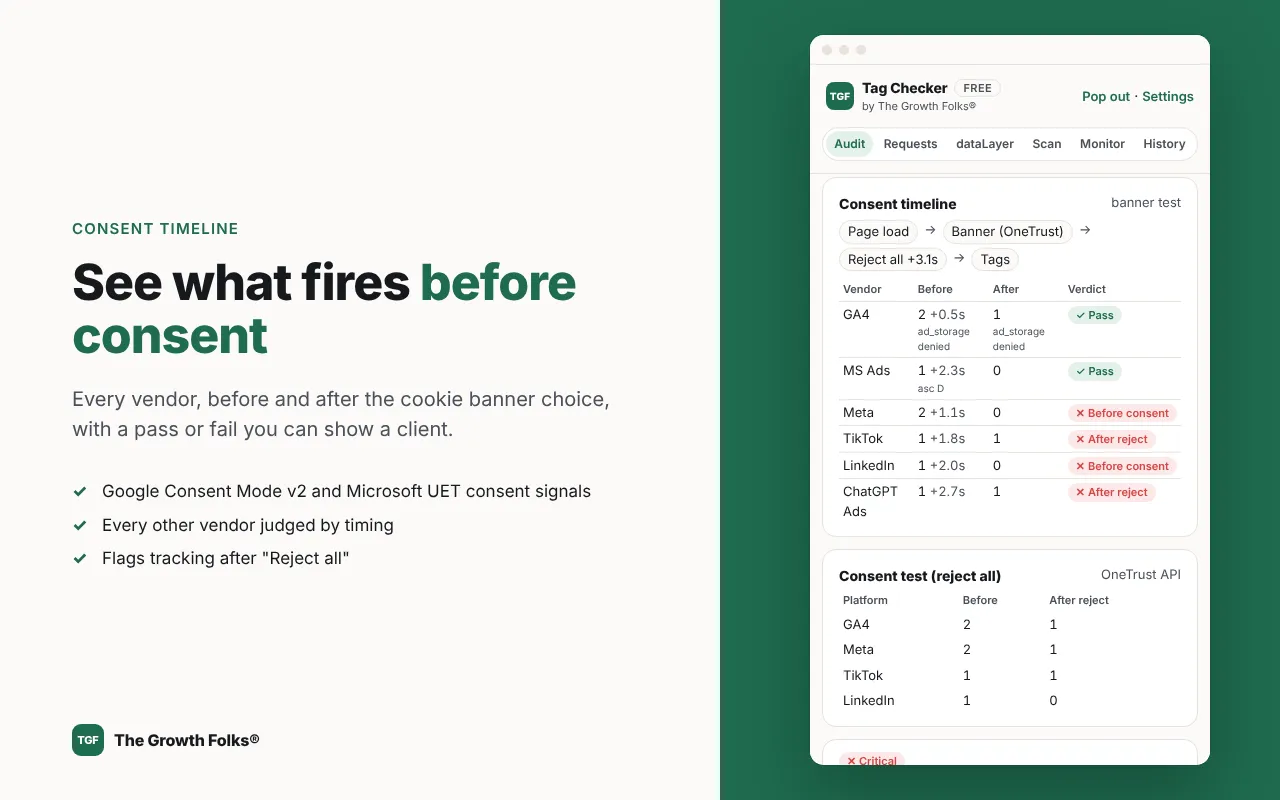
- Consent timeline by vendor Answers the question a consent review starts with: did anything fire before the visitor said yes?
- Google, Microsoft Ads, Meta, TikTok, LinkedIn, ChatGPT Ads and more, in the order they fired
- What each one sent before the banner choice and after Accept all or Reject all
- A pass or fail per vendor that you can show a client
- One-click audit of 16 platforms One click shows which tags fired, which didn't and what to fix first.
- Firing, not firing, firing twice or blocked, with the HTTP status of each request
- A score from 0 to 100 with fixes in plain English
- Purchase value, currency and order ID checks, plus personal-data leaks
- ChatGPT Ads pixel checker Check that ChatGPT Ads conversions are being counted and credited, the same way you check any other pixel.
- Decodes OpenAI pixel events and amounts
- Checks the oppref click ID is captured
- Warns if a Conversions API key is exposed in page code
- Meta data restrictions pre-check Meta restricts events that look like health or other sensitive data, and you usually find out after it has happened.
- Scans URLs, UTMs, custom events and custom data
- Flags the words likely to trigger a restriction
- Tells you what to change
- Cookie banner and GPC tests Test the banner the way a visitor would, without clicking through it on every page yourself.
- Clicks Accept all or Reject all on major consent platforms
- Reads Google Consent Mode v2 signals
- Reloads with Global Privacy Control to check US opt-outs
- Client-ready report Turn an audit into something you can send, not a folder of screenshots.
- Score, fixes and the consent timeline in one PDF
- Your logo, colour and call-to-action, plus changes since the last audit (Pro)
- Free reports carry a small credit line
- Request inspector and dataLayer timeline For the times you need to see the raw data behind a finding.
- Every tracking hit with readable parameter names and parsed consent strings
- Every dataLayer push in order, from the first line of the page
- Export to CSV, JSON or HAR
- Multi-page scans and monitoring A site release can break tracking without any error that someone would see.
- Scan up to 50 pages as a first-time visitor (3 on Free)
- Scheduled monitoring with desktop alerts when tracking breaks (Pro)
- Keep up to 500 saved audits (5 on Free)
-
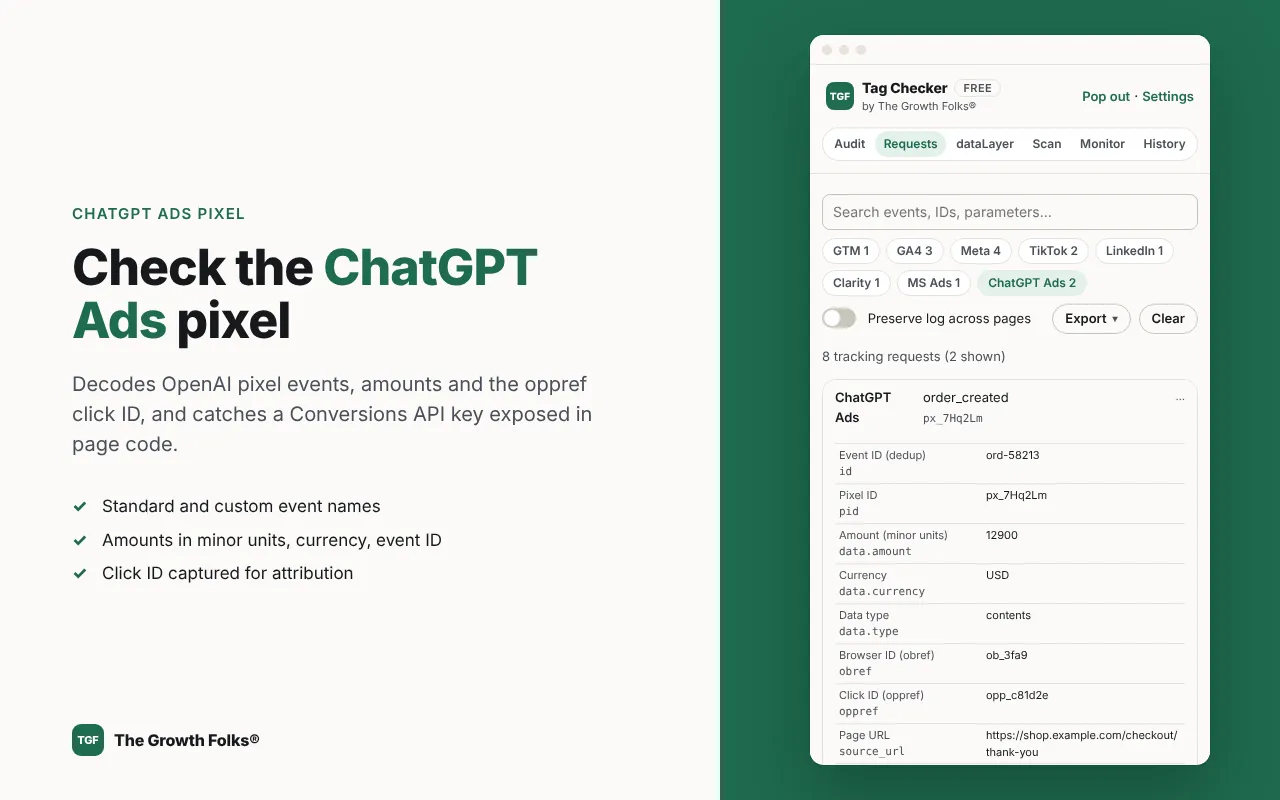
ChatGPT Ads pixel events decoded, with the oppref click ID check -
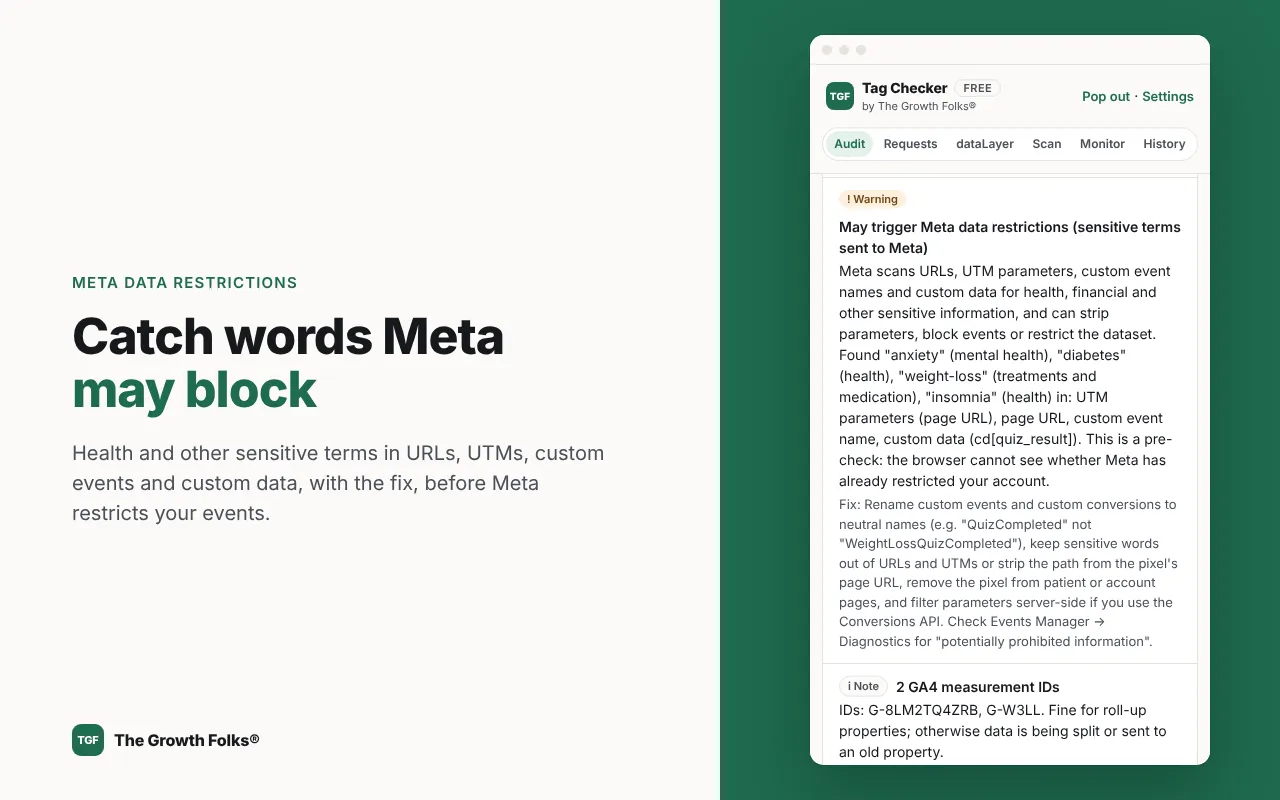
Meta data restrictions pre-check flagging sensitive words in URLs and event data -
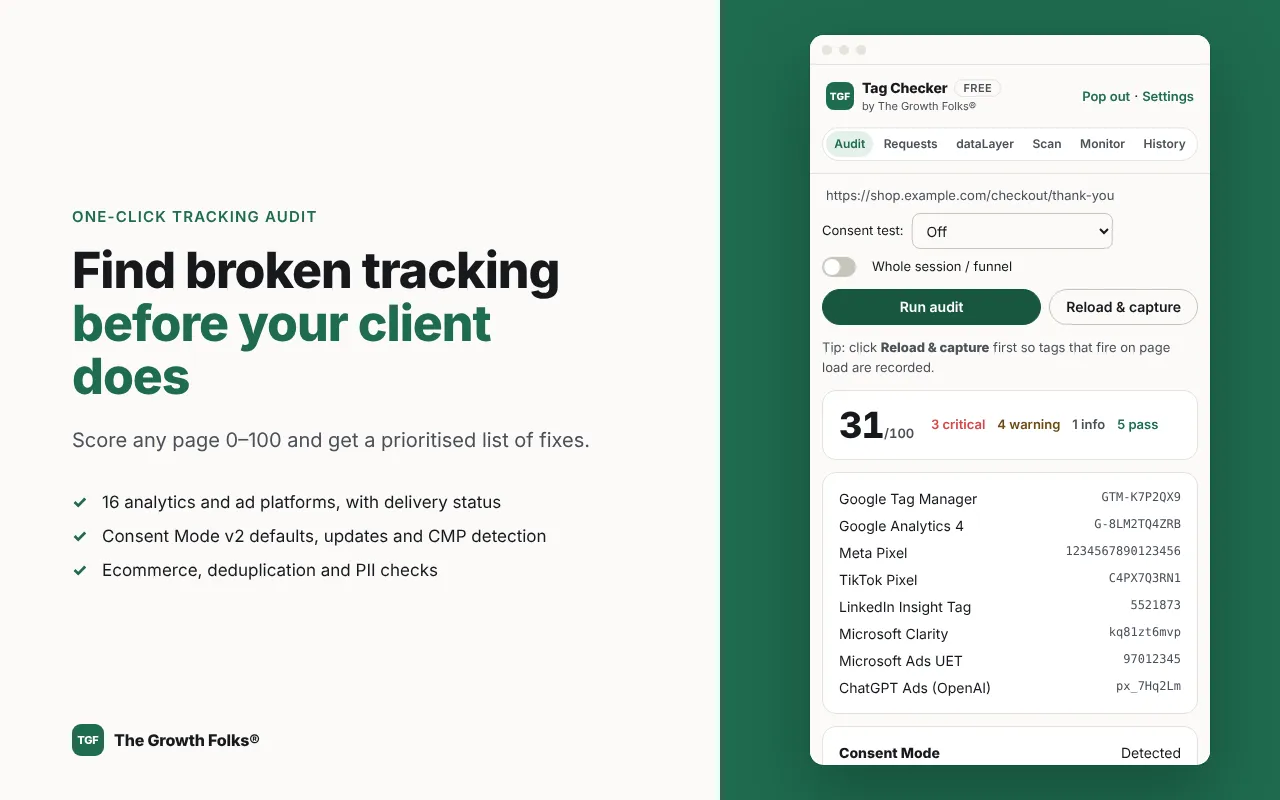
One-click tag audit with a 0 to 100 score, platforms found and prioritised fixes -
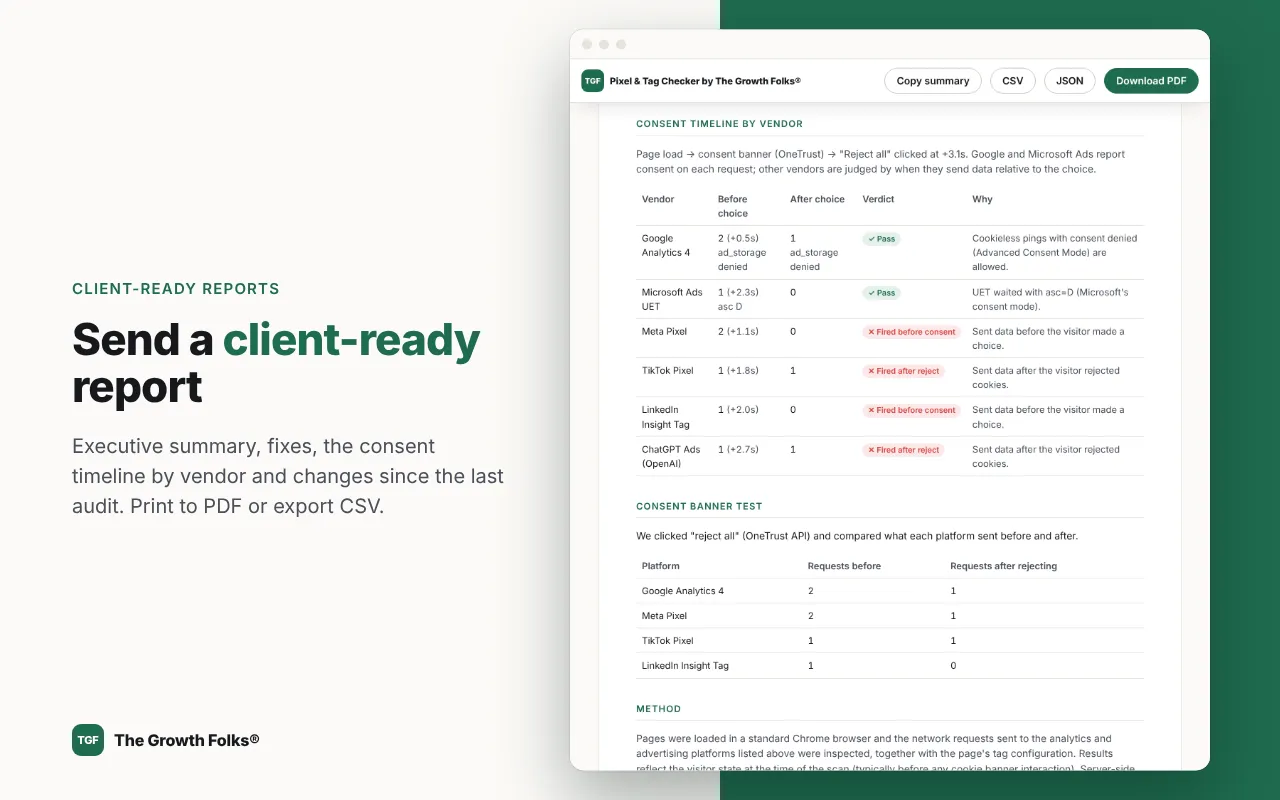
Client-ready audit report with the consent timeline and how-to-fix steps -
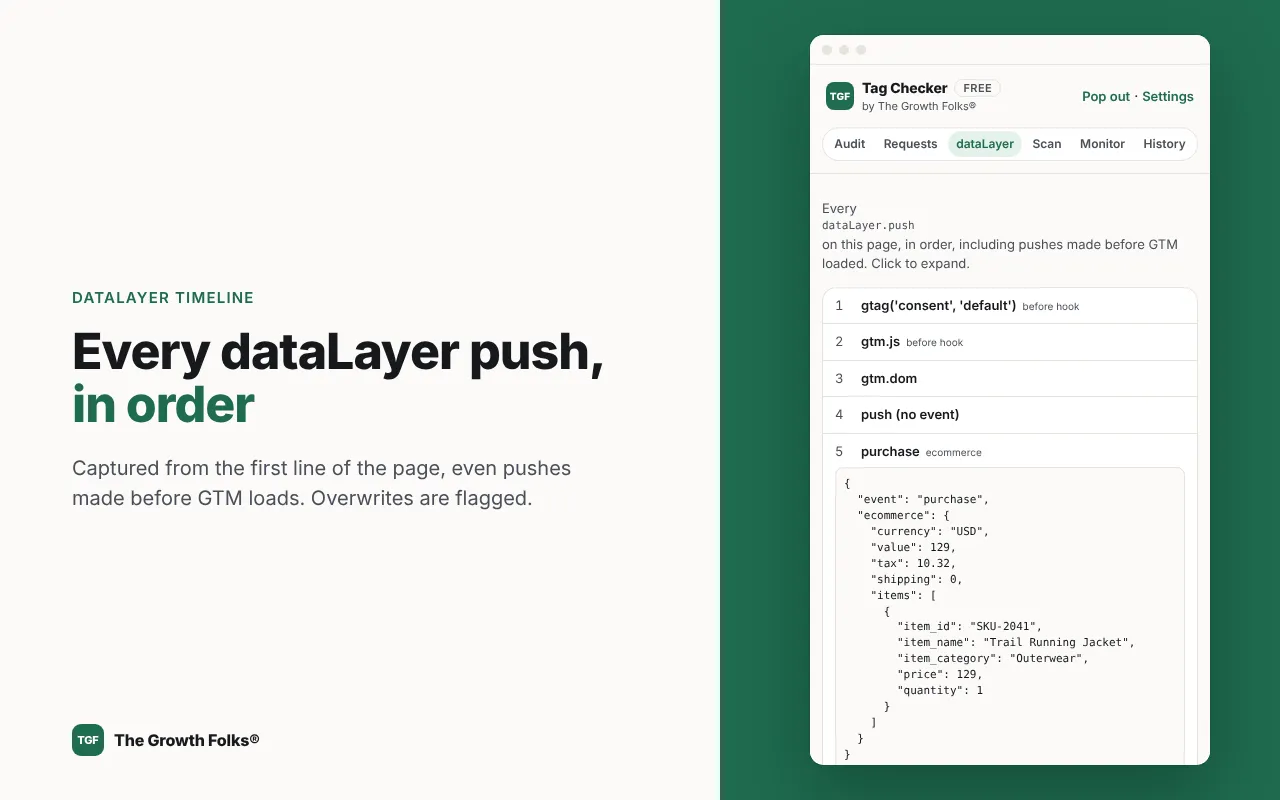
dataLayer timeline showing every push from the start of the page
How to use Pixel & Tag Checker
- Add Pixel & Tag Checker to Chrome from the Chrome Web Store and click its icon to open the side panel.
- Open the page you want to check and click Reload & capture.
- Click Run audit. For consent, choose Reject all or Accept all first.
- Read the score, the consent timeline and the fixes, then click Save & open client report to download the PDF.
Free and Pro
The free plan never expires. Pro is $19 a month or $190 a year, with a 7-day free trial.
Free
- Every check on 16 platforms, with a 0–100 score and fixes
- Consent timeline by vendor, cookie banner tests and the Global Privacy Control test
- Request inspector, dataLayer timeline and CSV, JSON and HAR exports
- Client reports with a small “Made with The Growth Folks®” credit
- Scans of up to 3 pages and your last 5 saved audits
Pro from $19 a month
- White-label client reports: your logo, colour, contact line and call-to-action, no credit line
- “Changes since last audit” in reports, to show clients what you fixed
- Scans of up to 50 pages, with a consent test on every page
- Scheduled monitoring of up to 20 sites with desktop alerts
- 500 saved audits
Who it’s for
- Agency and freelance tracking specialists who need client-ready proof
- In-house growth and performance marketers checking launches and new channels like ChatGPT Ads
- D2C founders and e-commerce operators, including Shopify stores in India
- Analysts, developers and privacy leads who need consent behaviour per vendor
What it can access, and why
Everything runs in your browser. Each permission and what it is used for:
Show all 9 permissions
-
sidePanelThe interface lives in Chrome's side panel. -
webRequest + access to all websitesReads (never changes) the requests pages send to tracking platforms, their bodies and HTTP status. Requests that don't match a known tracking endpoint are discarded. -
scriptingReads the page's tag and consent setup when you run an audit, and clicks the cookie banner only when you run a banner test. -
Content scriptsRecord dataLayer.push() calls from the first line of the page; calls pass through unchanged. -
cookiesCookie table and first-party ID checks: names, domains and expiry only, never values. -
declarativeNetRequestWithHostAccessAdds the Sec-GPC: 1 header to one tab during a GPC test only, then removes it. -
storage, unlimitedStorageLive logs, saved audits, settings and branding, all in your browser. -
Optional: browsingDataFresh visitor scans clear cookies for the scanned sites only, after confirmation. -
Optional: alarms, notificationsScheduled monitoring: re-scan on your schedule and alert you when tracking breaks.
Full details in the privacy policy.
Add Pixel & Tag Checker to Chrome
Free to install, no account. Upgrade to Pro from $19 a month when you need it.
Frequently asked questions
Is it free?
The audit is: every check, the consent and GPC tests, the inspectors, exports and client reports with a small credit line. Pro ($19 a month or $190 a year, 7-day free trial) adds white-label reports, "changes since last audit", 50-page scans, monitoring of up to 20 sites and 500 saved audits.
Does it send my data anywhere?
No. Everything runs in your browser. There's no account, server or analytics, and saved audits stay in your browser. If you buy Pro, only your licence key is checked with our payment provider.
Can it see server-side tracking (Conversions API, Measurement Protocol)?
No. It sees what the browser sends. It checks the browser side of deduplication (event IDs) and click-ID capture, and says clearly where server-side checks are needed.
How does it know a tag fired before consent?
Google and Microsoft Ads include a consent value in each request; for every other vendor it compares the request time with the moment the banner choice was made. Run the cookie banner test as a fresh visitor for a full verdict.
Will it tell me if Meta has restricted my account?
No. It's a pre-check: it flags words and parameters Meta's rules cover, so you can fix them before Meta restricts your events. Check Events Manager → Diagnostics for Meta's own view.
Why does it need access to all websites?
You can audit any site, and tracking requests go to many vendor domains (and sometimes to the site's own server-side Tag Manager domain), so it needs to observe requests on whatever page you audit. Requests that are not to known tracking endpoints are discarded immediately, and nothing is changed or blocked.
Will the consent test change my own cookie choices?
Yes, on the site you test: it clicks "Accept all" or "Reject all" on that site's banner, just as you would. Fresh visitor scans go further and delete that site's cookies and storage (logging you out), after asking you to confirm.
Tactics this tool helps with
- Acquisition
Audit your tracking before you scale ad spend
Check every pixel, tag and conversion event fires once, with the right values, before you raise budgets that depend on that data.
Impact High Effort Low + free toolCategories: Analytics, Paid Ads - Acquisition
Set up Google Consent Mode v2 without losing your conversion data
Pass visitors' cookie choices to Google tags correctly, so you stay compliant and keep modelled conversions and audiences in Google Ads.
Impact High Effort Medium + free toolCategories: Analytics, Paid Ads - Acquisition
Build lookalike audiences from your best customers
Feed ad platforms a clean list of your highest-value customers so they can find new people who look like them, instead of seeding from everyone.
Impact Medium Effort LowCategories: Paid Ads, Analytics - Acquisition
Retarget visitors with ads that match what they viewed
Show ads to past site visitors based on the pages they read, with frequency caps and exclusions so you spend on people who are still deciding.
Impact Medium Effort Medium + free toolCategories: Paid Ads, Analytics
Learn the framework behind it
Free lessons from the Growth Marketing Academy that explain the why, so you use the tool well.
- Track 2 · Acquisition Growth Loops: Build Acquisition That Compounds Funnels describe how users leak. Loops describe how users create more users. Learn to map, quantify and choose the loop that fits your product.
- Track 2 · Acquisition Paid Acquisition Architecture and Channel-Model Fit Structure paid accounts, run a creative testing cadence, read CAC, blended CAC, MER and ROAS correctly, and pick channels your price point can afford.
Want this handled for you?
Our growth agency sets up tracking, testing and campaigns end to end: strategy plus execution.
More free tools
- Live
UTM Builder & Checker for GA4
Build and check UTM links for GA4: channel prediction, page and email link checker, WhatsApp links, team rules, bulk and QR.
Get the extension → - Free
A/B Test Calculator
Check if a test result is real, and how much traffic you need before you start.
Use it free → - Free
Meta Tag Generator
Write title, description and social tags with live Google and social previews.
Use it free →